Core Optimization Algorithms
This section introduces the main scheduling algorithms.
Function schedule
Syntax and Algorithm Description
schedule executes the scheduling optimization. Specifically, it selects and runs one of four optimization algorithms depending on the input arguments.
When we run out = schedule(scenario,algorithm_type), it selects to run:
centralized algorithm for load flattening problem if
scenario.Problem_type == "Lf"andalgorithm_type == "cent"distributed algorithm for load flattening problem if
scenario.Problem_type == "Lf"andalgorithm_type == "dist"centralized algorithm for user-friendly problem if
scenario.Problem_type == "Uf"andalgorithm_type == "cent"distributed algorithm for user-friendly problem if
scenario.Problem_type == "Uf"andalgorithm_type == "dist"
Both centralized and distributed algorithms for load flattening problem are implemented in load_flattening.
The distributed algorithm for load flattening problem implemented in load_flattening is developed based on [1] and [2].
Meanwhile, both centralized and distributed algorithms for user-friendly problem are implemented in user_friendly. The distributed algorithm for user-friendly problem implemented in user_friendly is developed based on [3].
For more details about schedule, particularly regarding optional inputs, see schedule. For more details about code implementation of load_flattening or user_friendly, visit GitHub repository.
Output Format
After running schedule, the user gets a structure containing the following fields as an output.
Field |
Type |
Description |
|---|---|---|
|
T×N_c matrix |
Schedule for each charger |
|
scalar |
Total cost |
|
Scenario |
Scenario instance |
|
struct |
Metadata about when and how output was generated |
If scenario.Problem_type == "Lf", then the output structure also contains a field lam(T×1 matrix), which is a Lagrange multiplier for balance constraint.
Example
We revisit the example from Quick Demo. Data is provided in tutorial/Samples/.
% Preprocess input scenario
jsonfile = "Sample_Lf.json";
scenario = import_scenario(jsonfile);

% Run schedule()
out = schedule(scenario,"cent");

% Inspect the variable
openvar('out')

% Compare schedule u_1 of charger 1
T = out.scenario.T;
U = out.u;

stem(1:T, U(:,1))
Function schedule_rh
Syntax and Algorithm Description
In the real-time scheduling problem, information about future EVs, such as their arrival time slot, departure time slot, initial stored energy, and reference stored energy, is unknown prior to their arrival.
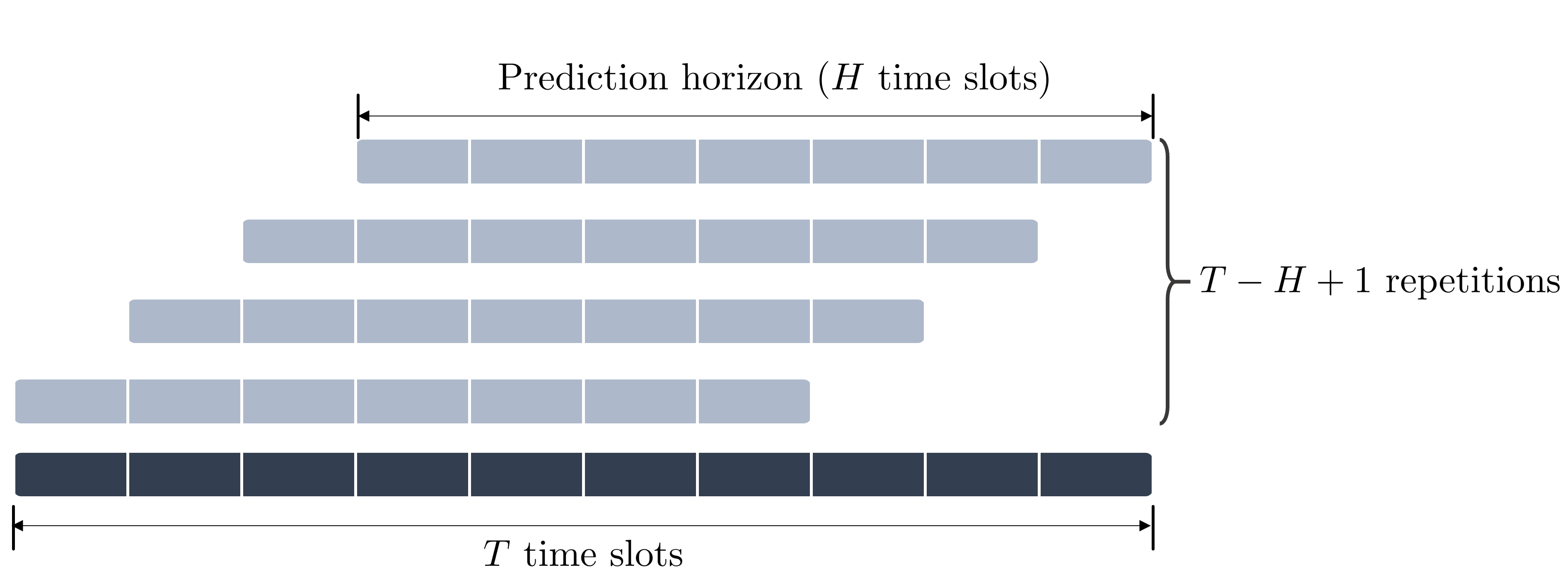
In this regard, schedule_rh performs real-time scheduling by repeatedly calling schedule based on the receding horizon scheme.
When out = schedule_rh(scenario,algorithm_type) is executed, the following procedure takes place.
scheduleis called considering only time slots1, \(\dots\) ,Hand the EVs connected at time slot1.Here,
His referred to as the length of the prediction horizon.Once the scheduling is completed, the charging schedules corresponding to time slot
1are applied.The procedure is then repeated as the prediction horizon recedes by on time slot; that is,
scheduleis called considering time slots2, \(\dots\) ,H+1and EVs connected at time slot2, and so on.The algorithm terminates when the prediction horizon can no longer recede, i.e., after
scenario.T - H + 1repetitions ofschedule.algorithm_typeis applied for each execution ofschedule.
Output Format
After running schedule_rh, the user gets a structure containing the following fields as an output.
Field |
Type |
Description |
|---|---|---|
|
(T-H+1)×N_c matrix |
Schedule for each charger |
|
scalar |
Total cost |
|
Scenario |
Scenario instance of length (T-H+1) |
|
struct |
Metadata about when and how output was generated |
If scenario.Problem_type == "Lf", then the output structure also contains a field lam ((T-H+1)×1 matrix), which is a Lagrange multiplier for balance constraint.
Example
We now apply the real-time scheduling algorithm for our example scenario.
% Preprocess input scenario
jsonfile = "Sample_Lf.json";
scenario = import_scenario(jsonfile);

% Run schedule()
H = 12;   % the length of the prediction horizon
out = schedule_rh(scenario,"cent",H=H);

% Inspect the variable
openvar('out')

% Compare schedule u_1 of charger 1
T_rh = out.scenario.T;   % = scenario.T-H+1
U_rh = out.u;

stem(1:T_rh, U_rh(:,1))