Simulation and Analysis
Here, we introduce application-level simulation tools which help users run automated multi-algorithm and multi-scenario evaluations.
simulate() Function
simulate() enables users to run multiple algorithms sequentially under the same scenario, for comparing different algorithms. Specifically, sim_out = schedule(scenario,Name=Value) to use following three types of algorithms:
oracle: if input argument
oracle = true(default)is given, it performs oracle scheduling which means scheduling with full future knowledgecent: if input argument
cent = trueis given, it performs centralized receding horizon schedulingdist: if input argument
dist = trueis given, it performs distributed receding horizon scheduling
For more details about simulate(), particularly regarding optional inputs, see simulate.
Output Format
After running simulate(), the user gets a structure containing the following fields as an output.
Field |
Type |
Description |
|---|---|---|
|
logical |
Performed oracle scheduling or not |
|
logical |
Performed centralized receding horizon scheduling or not |
|
logical |
Performed distributed receding horizon scheduling or not |
|
“Lf”|”Uf” |
Type of problem, either “Lf” for load flattening or “Uf” for user-friendly |
|
always false |
Whether it is Monte-Carlo Simulation or not |
|
always 1 |
Number of scenarios |
|
struct |
Structure containing common scenario and oracle/cent/dist scheduling results |
sim_out.monte_carlo is a flag that indicates whether sim_out is the output of the simulate() function or of the simulate_mc() function.
Example
The following example shows how to run simulate() for the example scenario.
% Set parameters
T0 = 24;
H = 6;
N_c = 20;
L = -ones(N_c+1);
for i=1:N_c+1
    L(i,i) = N_c;
end
arrival_rates = [1*ones(8,1); 3*ones(8,1); 1*ones(8,1); 3*ones(5,1)];
mean_stay_duration = 3*60;

% Create a scenario generator
gen = PoissonScenarioGenerator("Problem_type","Lf",'T',T0+H-1,...
    'N_c',N_c,'L',L,'arrival_rates',arrival_rates,...
    'mean_stay_duration',mean_stay_duration);

% Run simulate() for oracle and cent algorithm
sc = generate(gen);
sim_out = simulate(sc,H=H,cent=true);

% Save the data
save("sim_out_Lf.mat","-struct","sim_out");
simulate_mc() Function
simulate_mc() repeats simulate() several times in order to perform Monte-Carlo evaluation.
When we run mc_out = schedule(gen,N_sim,Name=Value) for PoissonScenarioGenerator object gen, it repeatedly generate scenario using same scenario generator gen, N_sim times. For each scenario, it calls simulate().
For more details about simulate_mc(), particularly regarding optional inputs, see simulate.
Tip
You can use any MyOwnScenarioGenerator inheriting AbstractScenarioGenerator as an input of simulate_mc()
Output Format
After running simulate_mc(), the user gets a structure containing the following fields as an output.
Field |
Type |
Description |
|---|---|---|
|
logical |
Performed oracle scheduling or not |
|
logical |
Performed centralized receding horizon scheduling or not |
|
logical |
Performed distributed receding horizon scheduling or not |
|
“Lf”|”Uf” |
Type of problem, either “Lf” for load flattening or “Uf” for user-friendly |
|
always true |
Whether it is Monte-Carlo Simulation or not |
|
positive integer |
Number of scenarios |
|
N_sim×1 struct array |
Structure containing common scenario and oracle/cent/dist scheduling results |
Since scenarios in repeated simulations are generated from the same scenario generator gen, they share the same properties such as Problem_type,N_c,T,Delta,etc.
Example
The following example shows how to run simulate_mc() for the example scenario.
% Set parameters
N_sim = 3;
T0 = 24;
H = 6;
N_c = 20;
L = -ones(N_c+1);
for i=1:N_c+1
    L(i,i) = N_c;
end
arrival_rates = [1*ones(8,1); 3*ones(8,1); 1*ones(8,1); 3*ones(5,1)];
mean_stay_duration = 3*60;

% Create a scenario generator
gen = PoissonScenarioGenerator("Problem_type","Lf",'T',T0+H-1,...
    'N_c',N_c,'L',L,'arrival_rates',arrival_rates,...
    'mean_stay_duration',mean_stay_duration);

% Run simulate_mc() for oracle and cent algorithm
mc_out = simulate_mc(gen,N_sim,H=H,cent=true);

% Save the data
save("mc_out_Lf.mat","-struct","mc_out");
analyze() Function
As well as automated functions of running multiple algorithms, we provide a visualization and analysis tool for users.
analyze() is created using matlab app designer, various performance metrics are given by interactive plots. Users can compare oracle, centralized-RH, and distributed-RH scheduling methods under identical simulation settings.
Following four examples show what can analyze() do. For more details about analyze(), such as loading data directly from a Workspace, see analyze.
Analyze Single-Scenario Result (Load Flattening)
In this example, the output of simulate() function for a load flattening scenario is required.
It can be generated manually following the earlier example, or obtained from the sim_out_Lf.mat located in the tutorial/Samples/ folder.
% Load output
sim_out = load("sim_out_Lf.mat");

% analyze()
analyze(data=sim_out);
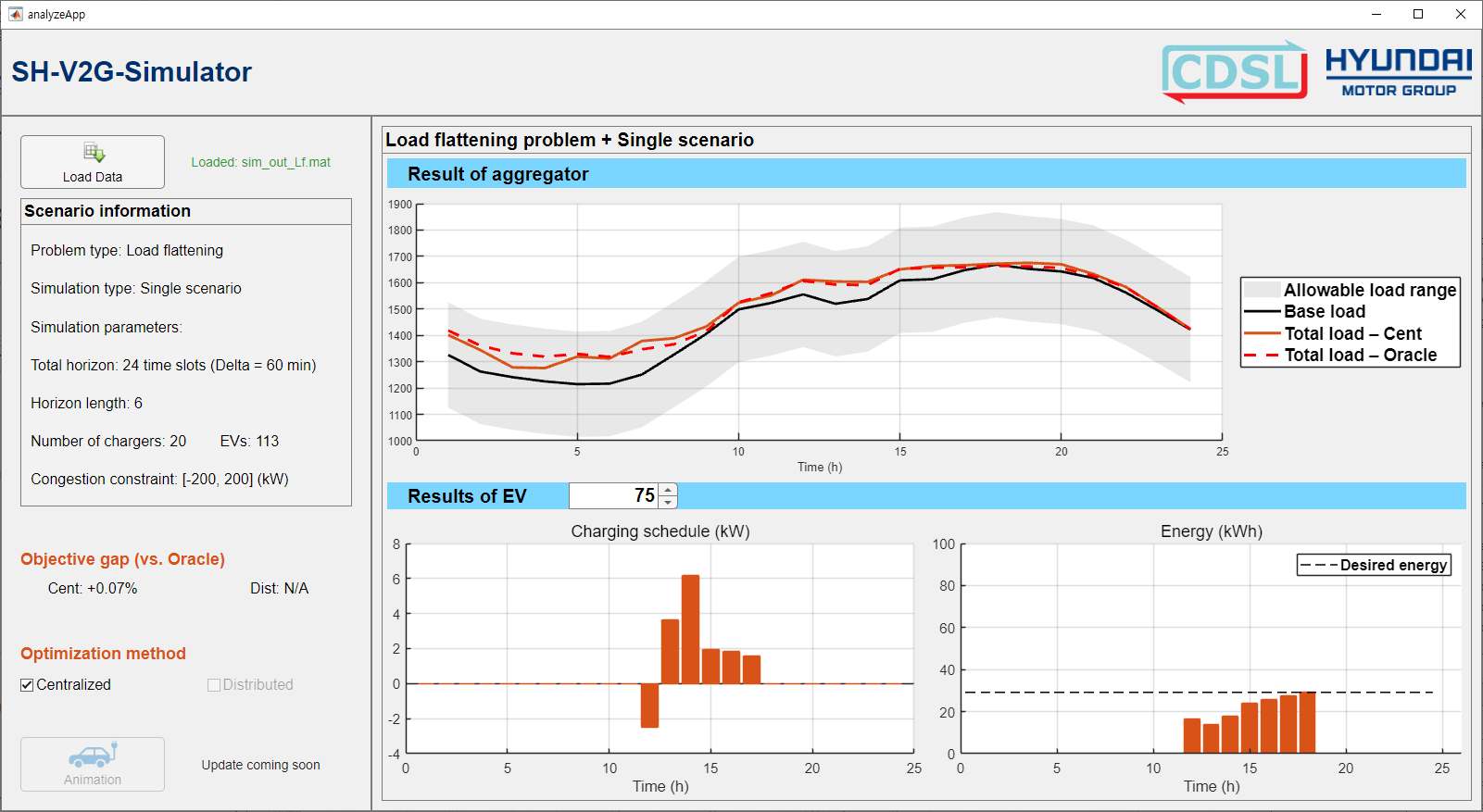
analyze helps evaluating the grid-level performance.
Analyze Single-Scenario Result (User-Friendly)
In this example, the output of simulate() function for a user-friendly scenario is required.
It can be generated manually following the earlier example, or obtained from the sim_out_Uf.mat located in the tutorial/Samples folder.
% Load output
sim_out = load("sim_out_Uf.mat");

% analyze()
analyze(data=sim_out);
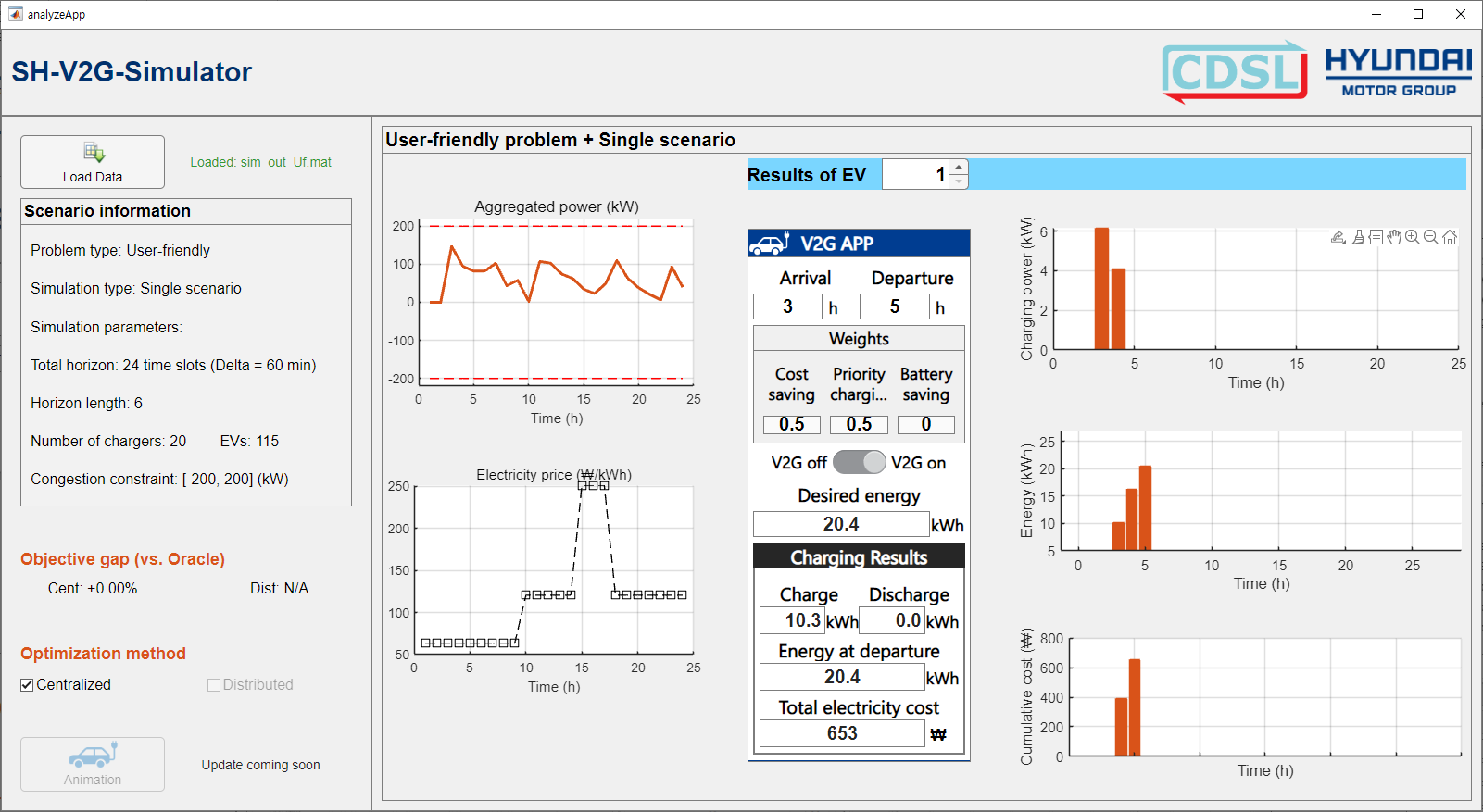
analyze helps evaluate the user-level performance, especially in terms of each user’s preference fulfillment.
Analyze Monte-Carlo Result (Load Flattening)
In this example, the output of simulate_mc() function for a load flattening scenario is required.
It can be generated manually following the earlier example, or obtained from the mc_out_Lf.mat located in the tutorial/Samples/ folder.
% Load output
mc_out = load("mc_out_Lf.mat");

% analyze()
analyze(data=mc_out);
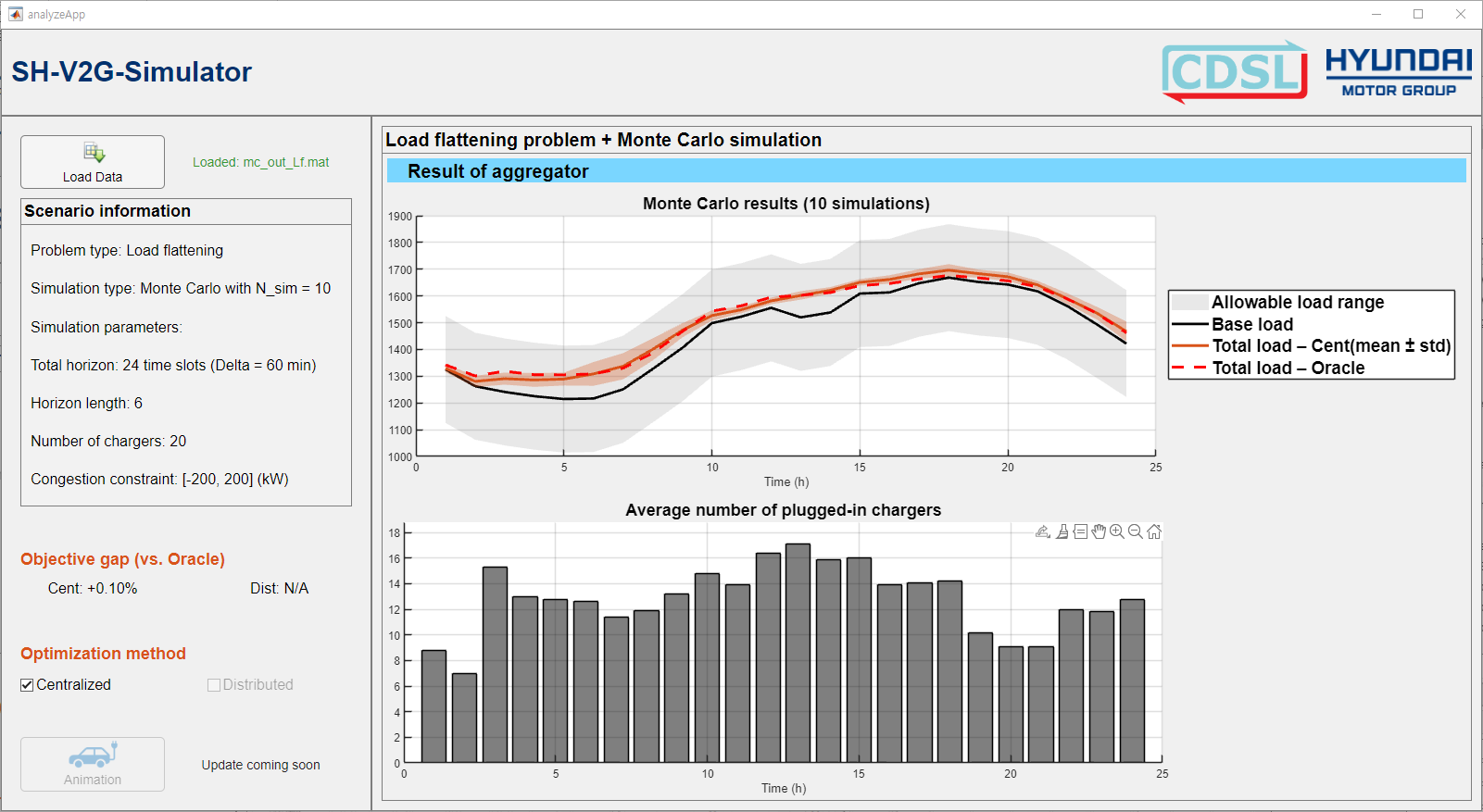
analyze helps examine the average effects across multiple scenarios.
Analyze Monte-Carlo Result (User-Friendly)
In this example, the output of simulate_mc() function for a load flattening scenario is required.
It can be generated manually following the earlier example, or obtained from the mc_out_Lf.mat located in the tutorial/Samples/ folder.
% Load output
mc_out = load("mc_out_Uf.mat");

% analyze()
analyze(data=mc_out);
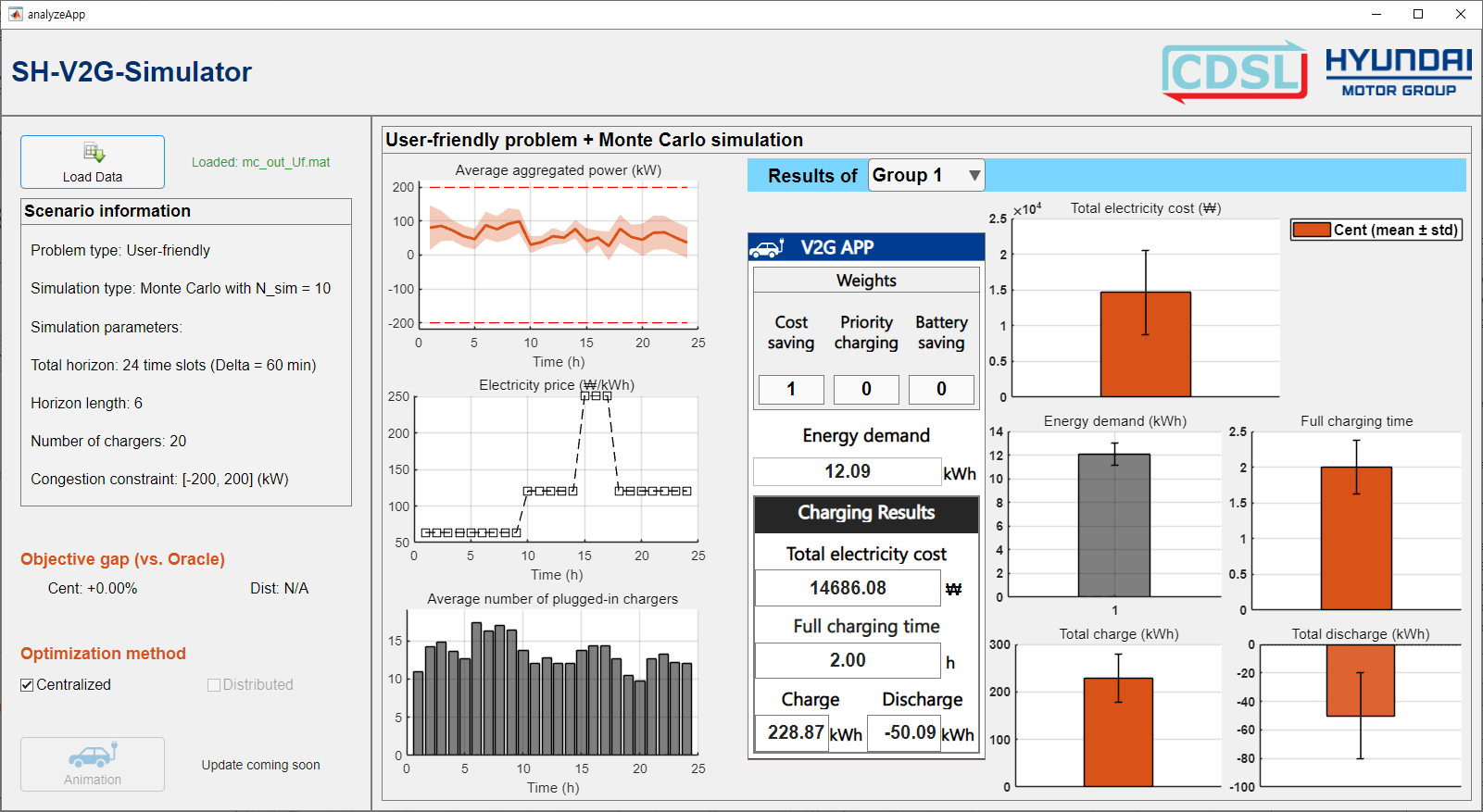
analyze helps examine the average effects across multiple scenarios.